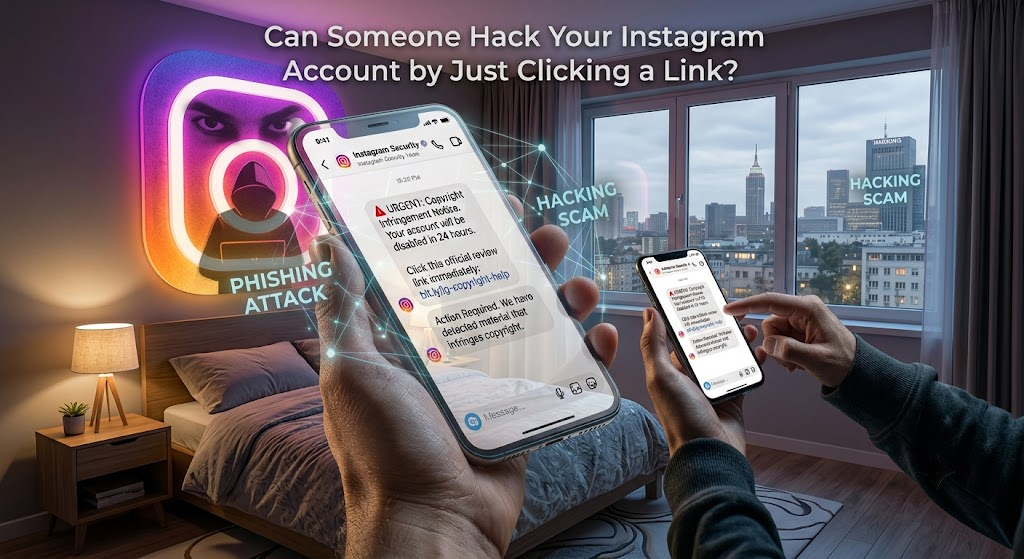
Instagram users receive thousands of suspicious messages every day, many of which contain links claiming to offer free followers, verification badges, copyright appeals, or account recovery. This has led many people to ask an important question: Can someone hack your Instagram account by just clicking a link?
The short answer is usually no. Simply clicking a link doesn’t normally allow someone to hack your Instagram account. However, clicking a malicious link can take you to a fake website that tricks you into revealing your login details or downloading harmful software. Understanding how these scams work is the best way to protect your account.
In this guide from Nobbe.site, we’ll explain the real risks, common scams, and the steps you should take to keep your Instagram account secure.
Can Clicking a Link Alone Hack Your Instagram?
In most cases, no.
Simply opening a website does not automatically give hackers access to your Instagram account. Instagram uses strong security measures that prevent someone from taking over your account just because you clicked a link.
However, the danger begins if you:
- Enter your Instagram username and password.
- Download a malicious file or app.
- Give permission to an untrusted third-party application.
- Share your two-factor authentication (2FA) code.
These actions can allow attackers to gain access to your account.
How Instagram Link Scams Work
Most Instagram hacking attempts rely on phishing rather than technical hacking.
Here’s how a typical scam works:
| Step | What Happens |
|---|---|
| 1 | You receive a message with a suspicious link. |
| 2 | The message claims your account is at risk or offers a reward. |
| 3 | You click the link and see a fake Instagram login page. |
| 4 | You enter your username and password. |
| 5 | The scammer captures your login details. |
| 6 | They try to access your Instagram account. |
This is why hackers target your information instead of breaking Instagram’s security.
Common Instagram Scam Links
Be cautious if you receive links promising:
- Free Instagram followers.
- Free verification badges.
- Copyright appeal forms.
- Account recovery services.
- Brand collaboration offers.
- Cash prizes or giveaways.
- “See who viewed your profile.”
- Exclusive Instagram features.
These offers are commonly used to steal login credentials.
Warning Signs of a Dangerous Link
Before clicking any link, check for these red flags:
- Strange or shortened URLs.
- Messages from unknown accounts.
- Poor grammar and spelling mistakes.
- Urgent warnings such as “Your account will be deleted today.”
- Requests for your Instagram password.
- Offers that seem too good to be true.
If something feels suspicious, avoid clicking the link.
What Happens If You Clicked the Link?
If you only opened the webpage and closed it without entering any information, your Instagram account is usually safe.
However, you should still:
- Close the suspicious website.
- Clear your browser history if desired.
- Avoid downloading any files.
- Run a security scan if something was downloaded.
- Monitor your Instagram account for unusual activity.
What If You Entered Your Instagram Password?
If you typed your password into a suspicious website, act immediately.
1. Change Your Instagram Password
Create a strong password that you haven’t used before.
2. Secure Your Email Account
Since your email is linked to Instagram, update its password as well.
3. Enable Two-Factor Authentication
Two-factor authentication adds an extra layer of protection by requiring a verification code when someone tries to log in.
4. Review Login Activity
Check your account for unfamiliar devices or locations.
If you notice anything unusual, log out of all unknown sessions.
5. Remove Suspicious Apps
Review any third-party apps connected to your Instagram account and remove those you don’t recognize.
Tips to Protect Your Instagram Account
Following a few simple habits can significantly improve your account security.
| Security Tip | Benefit |
|---|---|
| Use a strong password | Reduces the risk of unauthorized access. |
| Enable Two-Factor Authentication | Protects your account even if your password is stolen. |
| Ignore suspicious links | Prevents phishing attacks. |
| Verify official emails | Helps identify genuine Instagram notifications. |
| Keep your device updated | Improves security against known vulnerabilities. |
Can a Phone Be Infected by Clicking a Link?
In rare cases, clicking a malicious link could lead to harmful downloads or unsafe websites, especially if you install unknown apps or allow unnecessary permissions.
To stay safe:
- Never install apps from unknown sources.
- Keep your phone updated.
- Download apps only from trusted app stores.
- Use built-in security features on your device.
How to Verify Real Instagram Messages
If you receive a message claiming to be from Instagram:
- Check your official account notifications.
- Verify emails through Instagram’s security settings.
- Ignore direct messages requesting passwords.
- Never share verification codes with anyone.
Official Instagram communications never ask you to reveal your password through a direct message.
Frequently Asked Questions
Can someone hack my Instagram by just sending me a link?
No. Receiving a link alone cannot hack your account. The real danger comes from entering your login details or downloading malicious files.
Is it safe if I only clicked the link?
Usually, yes. If you didn’t provide any information or install anything, your account is generally safe. Still, it’s wise to stay alert and monitor your account.
What should I do after clicking a suspicious link?
Close the page, avoid interacting with it further, and change your password immediately if you entered any credentials.
Can Two-Factor Authentication stop hackers?
Yes. Two-Factor Authentication greatly increases your account’s security by requiring a second verification step before login.
How can I recognize fake Instagram websites?
Look for unusual web addresses, poor design, spelling errors, or requests for sensitive information. If anything seems suspicious, leave the site immediately.
Final Thoughts
Simply clicking a suspicious link does not usually mean your Instagram account has been hacked. Most attacks rely on phishing, where scammers trick users into revealing passwords or installing malicious software. By staying cautious, enabling Two-Factor Authentication, and avoiding untrusted links, you can greatly reduce the risk of losing your account.
At Nobbe.site, we provide practical technology guides and online safety tips to help users protect their social media accounts. Visit Nobbe.site regularly for more Instagram tutorials, cybersecurity advice, and easy-to-follow tech guides that keep you informed and secure.