Let’s face it: most of us spend upwards of eight hours a day glued to a desk chair. While you might be highly productive, your body could be paying a heavy price. Slouching, leaning forward, and cradling a phone between your shoulder and ear are fast-track tickets to chronic back pain, neck strain, and crippling fatigue.
Improving your posture at your desk isn’t just about looking professional—it is about protecting your long-term health and boosting your daily energy.
Here is a comprehensive, step-by-step guide to mastering desk ergonomics and correcting your sitting habits for good.
Why Good Posture Matters More Than You Think
When you slouch, you place massive amounts of extra pressure on your spine, muscles, and joints. Over time, this poor alignment can lead to:
-
Chronic lower back and neck pain.
-
Repetitive strain injuries (RSIs) like Carpal Tunnel Syndrome.
-
Decreased lung capacity (slouching compresses your diaphragm).
-
Poor blood circulation and digestive issues.
By intentionally improving your posture, you align your bones and joints correctly, allowing your muscles to work efficiently and reducing overall physical fatigue.
1. The Blueprint of a Perfect Ergonomic Desk Setup
You can’t maintain good posture if your workstation is actively working against you. To build a solid foundation, adjust your workspace using these fundamental ergonomic rules:
Optimize Your Chair Height
Your feet should rest flat on the floor, with your knees bent at a 90-degree angle. If your chair is too high, your legs dangle, pulling your lower back forward. If it’s too low, your knees sit higher than your hips, stressing your pelvis.
SEO Tip: If your feet don’t comfortably reach the floor, invest in a sturdy footrest to maintain proper alignment.
Adjust Your Monitor to Eye Level
Your neck should always remain neutral. Position your screen directly in front of you, about an arm’s length away. The top third of your monitor screen should be at or slightly below eye level. This prevents you from constantly tilting your head down or straining your neck forward (a phenomenon known as “tech neck”).
Position Your Keyboard and Mouse Comfortably
Your keyboard and mouse should be placed closely together on the same surface. When typing, your elbows should form a 90-degree angle, and your wrists should remain straight and neutral—not bent upwards or downwards.
2. 4 Actionable Habits to Fix Your Sitting Posture
An ergonomic setup is only half the battle; you also need to build body awareness. Implement these four habits throughout your workday:
-
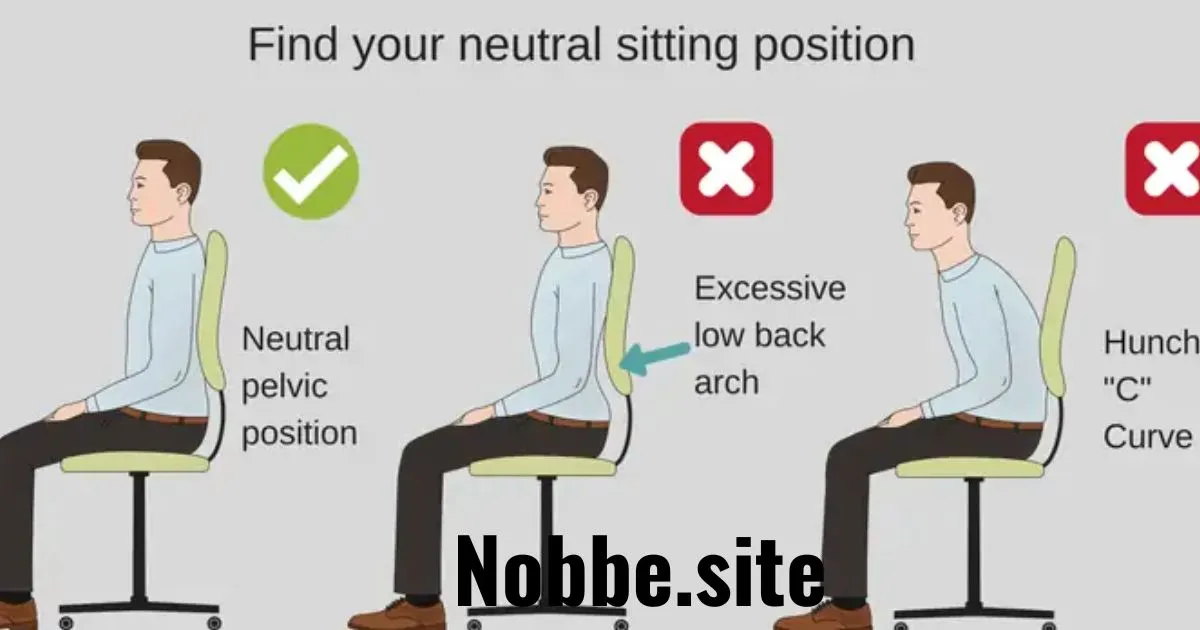
Sit Back in Your Chair: Do not perch on the edge of your seat. Keep your hips pushed all the way to the back of the chair so that your spine is fully supported by the backrest.
-
Uncross Your Legs: Crossing your legs at the knees or ankles misaligns your pelvis and forces your spine to curve unevenly. Keep both feet planted firmly on the grounding surface.
-
Keep Your Shoulders Relaxed: It is incredibly common to unconsciously shrug your shoulders toward your ears when stressed or deep in thought. Periodically drop your shoulders, roll them back, and let them relax.
-
Engage Your Core: Gently pulling your belly button toward your spine stabilizes your torso and naturally prevents your lower back from slumping over time.
3. The Power of Micro-Breaks and Movement
The human body was simply not designed to sit still for hours on end, no matter how perfect your posture is. The best posture is your next posture—meaning movement is key.
Implement the 50/10 Rule
For every 50 minutes of focused desk work, take a 10-minute movement break. Stand up, stretch, grab a glass of water, or walk around your office space.
Try Simple Desk Stretches
To combat stiffness right at your desk, try these three quick movements:
-
The Chin Tuck: Look straight ahead and pull your chin straight back (as if making a double chin). Hold for 5 seconds to reverse neck strain.
-
Chest Opener: Interlace your fingers behind your back, straighten your arms, and gently lift your chest toward the ceiling to counter forward slouching.
-
Seated Spinal Twist: Sit tall, place your left hand on your right knee, and gently twist your upper body to the right. Repeat on the other side.
4. Investing in Posture-Boosting Accessories
If you find it difficult to maintain proper form on your own, consider upgrading your toolkit with these highly effective ergonomic aids:
| Accessory | Why You Need It |
| Lumbar Support Pillow | Fills the natural curve of your lower spine to prevent slouching. |
| Laptop Stand | Elevates a laptop screen to eye level so you don’t look down. |
| Ergonomic Mouse | Places your hand in a natural “handshake” position to save your wrist. |
| Sit-Stand Desk | Allows you to alternate seamlessly between sitting and standing. |
Final Thoughts: Consistency Over Perfection
Do not expect to transition to flawless posture overnight. Your muscles have likely adapted to years of slouching, and rebuilding that core strength takes time.
Start by making small adjustments: fix your monitor height today, focus on keeping your feet flat tomorrow, and set a timer for movement breaks next week. Over time, these small actions will become second nature, leaving you with more energy, zero pain, and a much healthier spine.